iMyFone Umate software Review
iMyFone is an software for iOS for those who has their iPhone storage full. It will really be a hard time for those who use an iPhone and when they look at the Red storage app.
Talking about the software itself, iMyFone Umate is an app which is pretty light app which has a main objective of cleaning up the unwanted stuffs like temporary files or space occupied by the data of deleted apps and as such. Mostly these kind of files wont be accessible by the day to day users but this app can easily identify and clear them out.Must Read:How to clear cookies on iPhone ?
The iMyFone software is available for iPhone, iPad, iPod and this app already knows where to look for unwanted files and removes them all. First it scans, then asks for permission and then removes it.
Ultimately by removing them, what you get is lots of free storage and a speedy iPhone. With a beautiful user interface and self explanatory buttons, this app doesn’t need a separate tutorial for those who don’t know to use the app.Related:iMyFone recover deleted text messages iPhone without backup
Key features :
· Clean up junk files in a tap.
· Clean up temporary files.
· Backup and delete large files.
· Remove unused app.
· Remove deleted app data.
· Preview and erase private data.
· Completely erase data. (Non-recoverable)
Conclusion :
To be honest iMyFone is way more better in terms of user interface and ease to use when compared to other apps. And removing just junk and temporary files using this apps would remove more than 500MB of storage which is lot for those who still use a 16GB iPhone.
There’s a pro version and a free version. The main difference is the upgrade. Pro version gets lifetime upgrade whereas the free/trial version won’t. And the second big difference is the trial version won’t clear the temporary files but the pro version will do.
Friday, March 10, 2017

Tuesday, March 7, 2017
iMyFone Umate Pro Review: Best iOS Space Saving Software
If you are looking to free space on your iPhone or if you plan to sell your device to someone and you need to ensure that all the files and private information are completely removed, iMyFone Umate Pro is here to help you.
Here we go with my iMyFone Umate Pro review.
Get Started
1. Go to iMyFone Umate Pro page and install the software on your device.
2. iMyFone is available for both Mac and Windows. Choose which one you want.
3. Run the File.
That’s it. You have successfully installed software on your device.
Clean your iOS Device
Once you have successfully installed iMyFone Umate on your device, you can see a page like this.
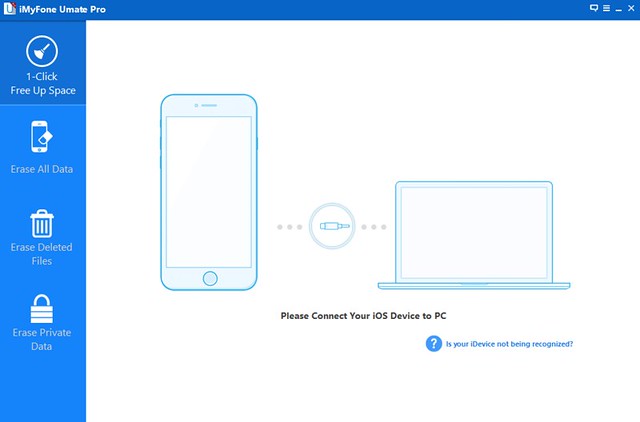
It’s really easy to use. Just plug your device and you are ready to go.
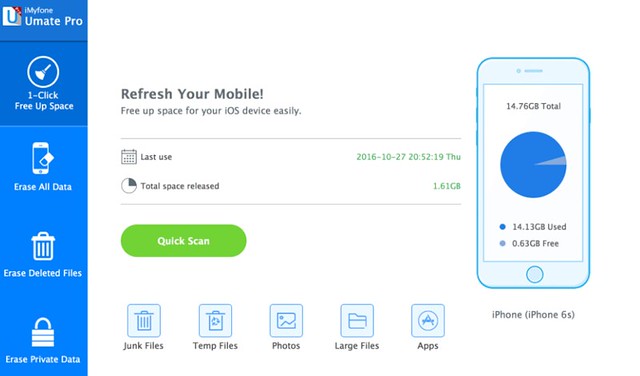
There are 4 types of actions you can perform with iMyFone Umate. Here we go.
Free Up Space
The One click Free Up Space lets you delete all unwanted files from your device like junk files, temporary files, removing large files, etc. To perform this action, just click “1-Click Free Up Space” at the left side of the page.
Erase All Data
Erase All Data helps you to clean your device by deleting all data’s ever stored on. You might think if a Factory Reset can do this. But my personal opinion is that Factory reset is not enough to delete all data permanently that’s why I recommend you to use iMyFone Umate Pro. Their data destroyer can do this job easily for you. Please note that this will delete all data’s you stored on your device and only use this function if you really need.
Erase Deleted Files
You might surprise by this option. What’s the purpose of erasing deleted files? Normally it’s possible to recover deleted files from your iPhone and this will be a real challenge on your privacy. But iMyFone Umate Pro can show these deleted files and erase them with no chance of recovery. Isn’s that super?
Erase Private Data
This data eraser will remove your private data with 100% unrecoverable and keeping your private information safe and secure. This private data can be things like your call history, SMS, browsing history, notes, WhatsApp chats, WhatsApp attachments, etc.
iMyFone Umate Pricing
iMyFone provides different software and you can choose the most suitable version for you. You can try the software for free but it’s limited in its features. You can but Umate Standard for $19.95 (regularly $29.95) or Umate Pro for $29.95 (regularly $49.95). Just share a Tweet on Twitter, Facebook or Google+ to get a $5 discount.
Final Verdict
iMyFone Umate Pro gives what you spend. If you purchased software, the License will be sent to you automatically within minutes, you will get free technical support and free lifetime update. All iMyFone products come with a 30 day Money Back Guarantee so you won’t need to worry about anything.
Subscribe to:
Comments (Atom)
Gihosoft TubeGet – Best Free YouTube Video Downloader
Gihosoft TubeGet – Best Free YouTube Video Downloader No doubt, YouTube is the largest video sharing site on the Web, where you can fre...
